



MCP Server Best Practices for Production Integrations

MCP Server Best Practices: How to Build Production-Ready AI Integrations
The Model Context Protocol (MCP) is reshaping how AI applications integrate with external systems and data sources. But building an MCP server that is production-ready, reliable, secure and performant requires more than basic protocol implementation. It demands careful architectural decisions, robust error handling and an understanding of distributed system principles.
In this guide, we will walk you through the architectural foundations, design principles, and essential patterns required to build a production-ready MCP server. We’ll examine authentication, authorization, error handling, and resilience strategies that ensure your server is secure, reliable, and maintainable in production environments.
You can find our complete Hubstaff MCP server implementation on GitHub. For a deeper dive into the concrete implementation details, check out our companion article on Building the Hubstaff MCP Server.
What is an MCP Server?
An MCP server is a service that implements the Model Context Protocol, an open-source standard for connecting AI applications to external systems. It acts as a universal bridge between your external data, sources or tools and AI systems.
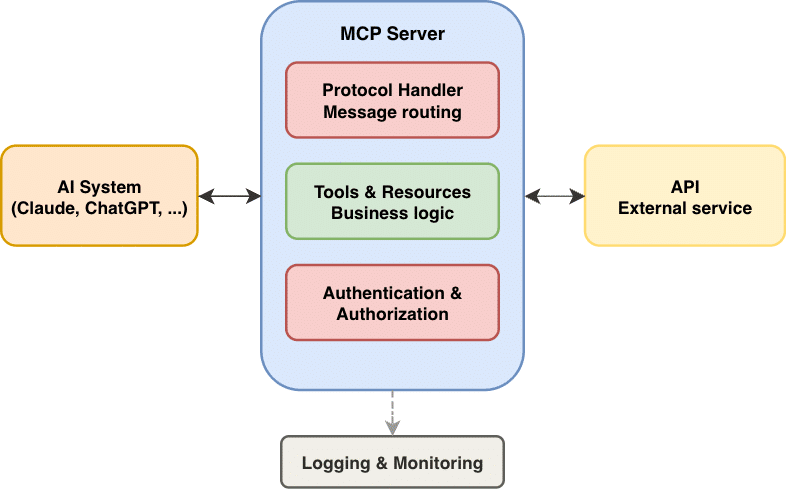
At its core, an MCP server exposes capabilities as tools: specific actions and operations your AI system can request and use. Your AI system (the client) consumes these tools to accomplish tasks.
Why build an MCP Server?
Foundation of AI-Native Applications
Modern AI applications need structured, protocol-based access to your data and services. MCP servers provide this in a standardized way.
Decoupling and Modularity
Build once, use with any MCP client. Once your MCP server is built, any application or AI system that supports the MCP protocol can connect to it and use your tools. Your integration becomes a reusable component.
Scalability
One server can serve multiple clients simultaneously, centralizing logic and reducing duplication.
Security and Control
Exposing integrations securely is complex. If you give external applications direct API access, you risk credential leaks, unauthorized actions, and compliance violations. MCP servers let you control exactly what data and operations are exposed, while taking care of authentication and authorization. Instead of giving external applications or AI systems direct access to your API credentials and full database, you define a clear perimeter.
Future-Proofing
As the AI landscape evolves and LLMs improve, MCP servers remain relevant. You’re not locked into a single integration approach. When you adopt new AI systems, you don’t rebuild the integration; you point them to your existing MCP server. Your integration investment remains relevant regardless of how the AI landscape shifts.
Architectural Foundations
Core Server Architecture
A production MCP server has several architectural layers with distinct responsibilities:
- MCP Protocol Handler: Parses incoming messages, routes to the correct tool handler, formats responses. Should be agnostic to business logic.
- Capabilities Layer: Implements tools, resources, and prompts. This is where your business logic lives.
- Authentication/Authorization Layer: Validates credentials, checks permissions before executing capabilities.
- Service Integration Layer: Handles external API calls, database queries, caching logic.
- Resilience: Retry logic, circuit breakers, timeout handling, graceful degradation.
- Observability: Structured logging, metrics, tracing for debugging and monitoring.
Design Principles for MCP Servers
The following principles guide every architectural decision you make to build a server that remains maintainable, secure and reliable:
- Separation of Concerns: Keep protocol handling separate from business logic. Your tools should not know about HTTP requests or message formats
- Defense in Depth: Multiple layers of validation and error handling. Never trust input but always validate.
- Fail Safely: When something breaks, fail with clear error messages and appropriate status codes. Don’t hide failures.
- Statelessness: MCP servers work best when stateless. Any state (sessions, temporary data) should be managed externally.
- Rate Limiting: Protect against abuse and resource exhaustion. Implement rate limiting at the server and service levels.
- Structured Logging: Use structured logging (JSON) so you can query and analyze logs programmatically.
Authentication and Authorization
Authentication: Who are you?
One of the core tasks of your MCP server is to verify, that requests are legitimate. There are several common approaches when dealing with external services:
- API Keys: Simple token-based auth, good for service-to-service communication
- OAuth 2.0 / OpenID Connect: Standard for user-facing applications, supports delegation and refresh tokens
- Tokens (JWT): Stateless verification, easy to validate without database lookups
The specific mechanism matters less than the fundamental authentication principal of MCP servers: Authentication happens inside the server, never exposed to the AI client. Your AI system never sees credentials, tokens, or authorization headers. It just calls tools and gets results.
Authorization: What Are You Allowed to Do?
Once you know who’s making the request, you need to know what they’re allowed to do. Common patterns are:
- Role-Based Access Control (RBAC): Users have roles (admin, user, viewer); roles have permissions
- Resource-Owner Authorization: Users can only access their own resources
- Attribute-Based: Fine-grained control based on user attributes, resource properties, or context
The same key principle applies: Authorization logic lives inside the MCP server. The AI system doesn’t know about roles, permissions, or restrictions. It just uses the tools that you expose.
Implementation Best Practices
The following three core security practices are non-negotiable for secure authentication and authorization:
- Never expose credentials to the client. The AI system should never see API keys, tokens, or OAuth credentials. Keep them inside the server and use them for backend operations only.
- Authenticate every request. Every tool call should be validated. Don’t trust that a previous request was authentic.
- Authorize before executing. Check permissions before running any tool. Fail early with clear error messages.
Beyond these fundamentals, also consider API security best practices: using short-lived credentials, separating authentication from authorization in your code, hiding sensitive details in error messages, rate limiting to prevent abuse, and logging authentication failures for security monitoring.
Error Handling and Resilience
MCP Error Reporting
MCP defines two error reporting mechanisms:
Protocol-Level Errors (JSON-RPC Faults):
Protocol-level errors are issues with the request send from the AI system to the MCP server:
- Unknown tool: The client requested a tool, that does not exist.
- Invalid arguments: The parameters passed to the tool do not match its schema.
- Malformed request
Tool Execution Errors (LLM-Friendly Feedback)
Tool execution errors occur during tool execution:
- API failures: e.g. external services are down.
- Invalid input data: Parameters are valid, but they do not make sense semantically
- Business logic errors: e.g. permission denied, or API resource not found.
Resilience for External Service Failures
Since MCP servers typically call external APIs, you need to handle failures gracefully:
Retry with Exponential Backoff
For transient failures (temporary network issues, rate limits), retry with increasing delays. But do not retry permanent failures (auth failures, resource not found).
Timeout Handling
Set explicit timeouts on all external API calls. If a call takes too long, fail fast and return a tool execution error instead of hanging indefinitely.
Graceful Degradation
If a non-critical part of a response fails, return the core data anyway. Don’t fail the entire tool just because enrichment data is unavailable.
Testing & Quality Assurance
A production MCP server must be thoroughly tested across multiple levels:
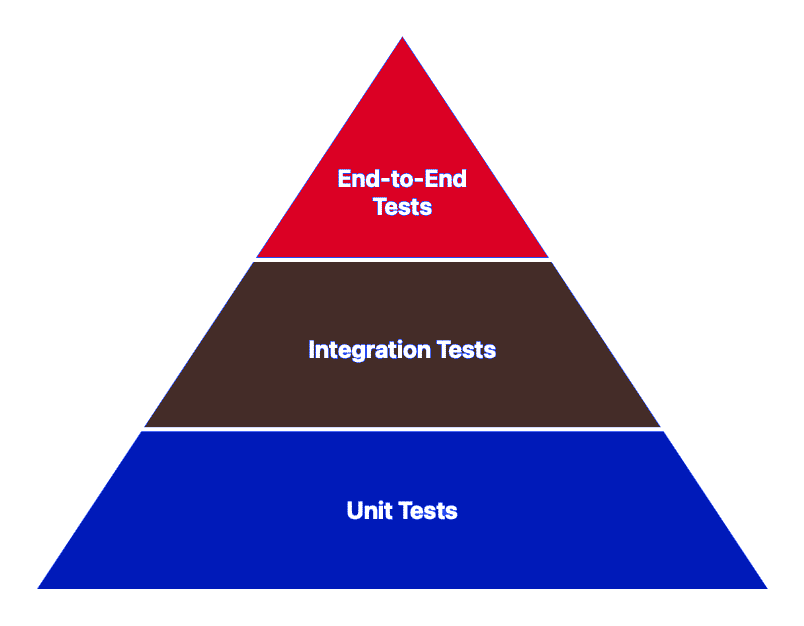
- Unit tests verify that individual tools behave correctly in isolation.
- Integration tests ensure your tools interact correctly with external APIs and databases, catching issues where protocol compliance meets real-world data.
- End-to-end tests verify the complete flow from protocol message to response, including authentication, authorization, and error handling. Pay special attention to boundary conditions: what happens with empty inputs, oversized payloads, or malformed requests? Test your resilience patterns too, mock API timeouts, rate limits, and service unavailability to ensure your retry logic and graceful degradation work as expected.
As your server grows, automated testing becomes non-negotiable, as it’s your safety net against regressions and a clear specification of how your server should behave.
Conclusion: Building Production-Ready MCP Servers
Building a production-ready MCP server requires more than implementing a protocol. It demands thoughtful architecture, resilience patterns, and rigorous security practices. The patterns outlined in this guide provide a foundation for building servers that are reliable, secure, and maintainable.
Whether you’re integrating a single service or exposing a complex platform, these principles apply: separate concerns to keep code clean, layer defenses to protect against attacks, handle errors explicitly to prevent silent failures and test thoroughly to ensure correctness.
By investing in production-ready architecture now, you’re building a foundation that scales as your needs grow. Start with the fundamentals, layer in resilience incrementally, test thoroughly, and iterate based on real-world usage. If you’re looking for expert guidance on implementing MCP servers or integrating AI services into your platform, the team at Emyoli Technologies specializes in building scalable, secure AI integrations tailored to your needs.